


Friend Location: Phone Tracker
3.364.00 Reviews
App Specs
- Version
- 1.0.4
- Updated On
- License
- Free
- Downloads
- 500,000+
- Developer
- MG-MagicSoftGaming
- Categories
- Maps & Navigation
- Platform
- Android
Screenshots
 Analysis by AppCompare
I’d approach Friend Location: Phone Tracker as a simple way to coordinate with people who have agreed to share their whereabouts, rather than as a general-purpose navigation tool. Its appeal is practical: when a friend is travelling to meet you or someone in your circle wants a little extra reassurance, a shared location can answer “Where are you?” without a string of messages. I like that focused purpose, though it also means the app is only useful when the people involved are comfortable participating.
Who should be in your first sharing circle?
For a first try, I would choose the people and occasion before inviting anyone. A friend you regularly meet after work or a relative who wants to share a journey home is a more useful starting point than adding a whole contact list. This keeps the arrangement easy to explain and gives everyone a clear reason to decide whether they want to take part.
It is also worth agreeing on what “sharing” means to your group. Some people may be comfortable checking a location during a planned meetup but not want friends to treat every movement as something that needs explaining. A quick conversation about when the app is useful can prevent that mismatch. If the group cannot agree on a comfortable boundary, occasional messages are likely to be the better tool.
What to expect from Friend Location
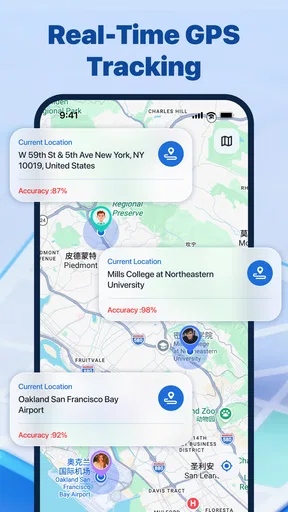
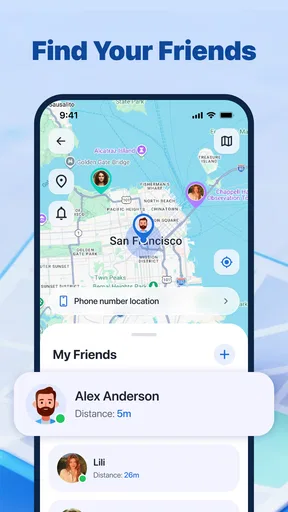
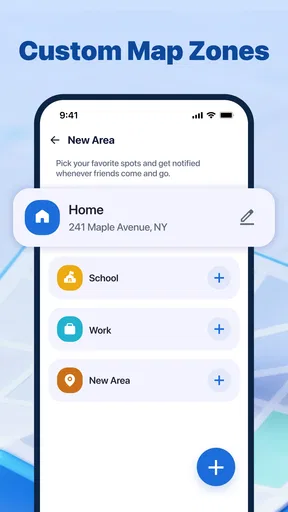
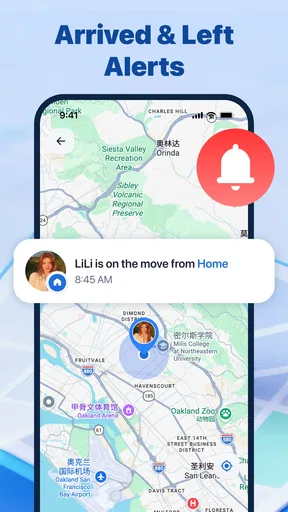
Friend Location: Phone Tracker is a free Maps & Navigation app from MG-MagicSoftGaming. The central idea is location sharing with authorized friends, paired with safety notifications. That gives it a more personal role than a map you open just to find a route: it is meant to help a small circle stay informed while each person chooses to take part.
That distinction matters before you install it. This is not a replacement for turn-by-turn directions, nor would I treat a friend’s position on a screen as proof that they are safe or available. Its value is in reducing coordination friction. If a friend is on the way, a shared view can be more convenient than repeatedly asking for updates; if someone wants their friends to receive safety-related notifications, that is part of the app’s intended use.
The app has an average rating of 3.3 from around 550 ratings, so I would go in with measured expectations rather than assume every part of the experience will feel polished. It has passed 500,000 installs, which suggests it has found an audience, but popularity alone cannot tell you whether it fits your group. The useful test is whether your friends are willing to authorize sharing and whether the app’s approach feels comfortable to everyone involved.
It is rated for Everyone and is listed for Android 7.0 and later. The current version is 1.0.4. Those details make it easier to judge whether it is relevant to your device, but compatibility is only the first step: location sharing depends on more than installing an app. Your phone’s location settings and the choices made by the people you invite will affect whether the experience is useful.
Worth Reading Before You Choose

Flipboard Shows What News Apps Must Do Beyond the Feed

Switching to Android Auto Means Rethinking Your Driving Routine

Google Calendar Makes a Crowded Week Easier to Manage

Ludo King Makes the Most of the Minutes Between Plans

Baby Panda World Brings Quick Play to Modern Phones, but Its Game Library Feels Busy

ESPN’s Live Game View Makes Following Close Games Easier
Set it up around consent, not assumptions
For a first-time user, I would begin by deciding who actually needs to be included. A small group makes the purpose clearer and avoids turning location sharing into a background expectation for everyone you know. Explain what you want to use it for—meeting up, coordinating a journey, or receiving safety notifications—and let each person decide whether that suits them.
After installing the app, take a moment to read each prompt and make deliberate choices. Location access is sensitive, so I would not tap through setup just to get to the map. Choose the access that supports the way you intend to use the app, and review your phone’s location controls if the app cannot show what you expect. The exact options can vary by device, so it is better to understand the prompt on your own screen than rely on instructions written for a different phone.
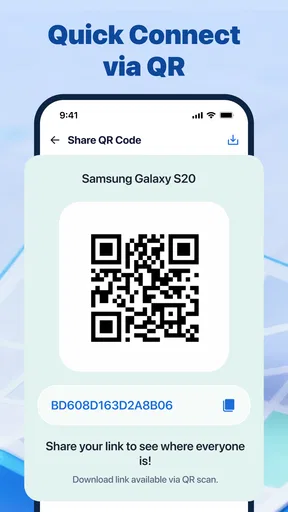
Next, invite or authorize only the friends who have agreed to share with you. The word “authorized” is important here: this should be a mutual arrangement, not a way to monitor someone without their knowledge. I would also agree on a simple norm with the group, such as using sharing for a particular outing rather than treating it as a constant check-in. That conversation prevents a helpful tool from becoming a source of pressure.
Before relying on the app for an important plan, check that the relevant people can see one another as intended. A short test while everyone is together is a low-stress way to catch setup confusion. If someone does not appear, confirm that they have joined or authorized sharing and that their phone’s location access is set appropriately. This kind of check is more useful than waiting until one person is already late and everyone is trying to troubleshoot at once.
Make the first test easy to interpret
When you test the arrangement, keep the variables simple: have the people involved check their settings, confirm that sharing is authorized, and compare what each person sees while together. That helps distinguish a setup issue from a misunderstanding about who has joined. I would avoid trying to diagnose several phones while the group is already moving between places; a calm check makes the first result much easier to read.
One useful way to judge whether the app earns a place in your routine is to ask what it changed. Did it reduce repeated “where are you?” messages, or did everyone still need to explain the meeting point? If the map only adds another screen to check, a message may be quicker. If it saves coordination during a journey, the shared arrangement may be worthwhile for that group.
The first useful moment is a real meetup
A realistic first success might be arranging to meet a friend at a busy station or a large park. Instead of sending “I’m here” and then trying to describe which entrance or path you used, each of you can check the shared location and coordinate from there. The map does not replace a clear meeting point, but it can help when one person is still moving and the other has already arrived.
I would make the first trial low stakes: choose a familiar destination, confirm that sharing is working, and use a direct message or call if the map leaves room for doubt. That approach shows whether the app helps your particular group without making anyone depend on it. It also gives you a chance to see how the safety notifications fit into your routine before using them during a more complicated trip.
One useful habit is to pair location sharing with a plain-language plan. “Meet at the north entrance” is still clearer than assuming everyone will interpret a map pin the same way. A location view can shorten the back-and-forth, but it may not explain whether someone is inside a building, waiting outside, or approaching from another side. The combination of a known landmark and shared position is more dependable than either on its own.
For a family member travelling home or a friend walking to an agreed destination, the safety-notification angle may be reassuring. Still, I would treat notifications as a helpful signal rather than an emergency service. If there is an immediate safety concern, contact the person directly or use the appropriate local emergency support. A phone app can make coordination easier; it cannot guarantee that a notification will arrive or replace human judgment.
Where first-time users can get confused
The most common misunderstanding is expecting location sharing to work simply because the app has been installed. Everyone who needs to appear has to participate in the authorized sharing arrangement, and a phone’s location settings can affect what is visible. If the map seems empty, check participation and settings before assuming the app itself is broken.
Another point to keep in mind is that a map position is a snapshot of someone’s phone location, not a conversation. It does not tell you why a person has stopped, whether they have noticed your message, or whether they want to be interrupted. If you need an answer rather than a rough sense of whereabouts, send a message or call. That small distinction helps prevent awkward assumptions and makes the app feel like a coordination aid instead of a substitute for communication.
Battery and signal conditions can also influence location tools in general, so I would avoid building a critical plan around uninterrupted updates. If someone is travelling through an area with unreliable reception or has a phone that is nearly out of charge, agree on a backup such as a meeting point or a check-in message. That is a sensible precaution for any location-sharing arrangement, not a reason to expect this app to solve every travel problem.
Privacy is the other practical friction. Some people are happy to share their location for a specific outing but dislike the idea of doing so routinely. Make it easy for friends to say no, and revisit the arrangement if the group’s needs change. If a person is uncomfortable, a direct arrival message or a planned check-in may be a better choice than asking them to install a tracker-style app.
How it compares with familiar alternatives
Compared with sending a location pin in a messaging app, Friend Location is aimed at an ongoing shared arrangement with authorized friends and safety notifications. A one-time pin is often enough when you just need to show someone where to meet you. The dedicated app makes more sense when the same small group expects to coordinate across a journey or wants location sharing to be part of how they keep one another informed.
Compared with a general navigation app, its emphasis is different. Navigation is for choosing a route and reaching a destination; this app is about keeping a friend group aware of location. I would use a navigation app when I need directions, and use Friend Location when the people involved have agreed that seeing one another’s position is useful. Neither role automatically replaces the other.
There is also a trade-off against simply texting updates. Messages take a little more effort, but they are specific: “I’m outside the west gate” conveys context that a map alone may not. Sharing can save repeated questions, while messages are better for explaining changes or confirming a precise meeting spot. In practice, I would keep both options available and use whichever communicates the situation more clearly.
Who will get the most from it
I can see this being useful for friends who often meet while travelling separately, families who mutually want a simple way to stay informed, or small groups coordinating an outing in a place where it is easy to lose one another. It suits people who already have a clear reason to share and are comfortable agreeing on boundaries. The app’s focused purpose is an advantage when a group wants a dedicated place for that routine.
I would skip it if you only need directions, if your friends prefer occasional texts, or if anyone in the group feels pressured to share. It is also not the right choice for someone seeking a guaranteed safety system or a substitute for contacting a person directly. In those cases, a standard map, a one-time location message, or a clear check-in plan may be simpler and more appropriate.
A useful decision point is whether your need is occasional or recurring. For one meeting, sending a pin and naming a landmark keeps things lightweight. For a group that often travels separately and has already agreed to share, a dedicated arrangement may reduce the repeated setup of one-off messages. The better choice is the one that fits the relationship and the occasion, not the one with the most tracking involved.
I would also avoid treating a location-sharing circle as a substitute for a proper plan when someone is travelling alone or has a time-sensitive appointment. Agree on a backup contact method and a simple check-in point before the journey starts. This is especially sensible if a phone might lose signal or power; relying on a map as the only way to coordinate turns a convenience into a single point of failure.
At the time of writing, the developer’s current release is version 1.0.4. I would keep expectations practical: try the app with one or two willing friends, verify that the sharing arrangement works on your phones, and decide whether notifications genuinely improve your routine. The best outcome is not constant monitoring; it is less confusion when a group has a real reason to coordinate.
My overall take is cautiously positive. Friend Location: Phone Tracker has a clear job, and it can make a meetup or journey easier when everyone understands the arrangement. Its limitations are just as important: it relies on consent, phone settings, and sensible communication, and a map position cannot explain the whole situation. If you want a shared location tool for an agreeable circle of friends, it is worth trying. If you want navigation, one-off directions, or a safety guarantee, I would choose a different approach.
Pros
- Simple map view makes it easy to check a friend’s shared location.
- Useful for coordinating meetups when plans or arrival times change.
- Location sharing can help groups keep track of one another while traveling.
- May provide reassurance when family members choose to share their whereabouts.
- A phone-based tracker can be more convenient than repeatedly asking for updates.
Cons
- Friends generally need the app and must agree to share their location.
- Location accuracy can vary with GPS
- network coverage
- and device settings.
- Frequent location updates may use battery power and mobile data.
- Background location access raises privacy concerns for some users.
- A tracker cannot guarantee someone’s safety or replace direct communication.
FAQs for Friend Location: Phone Tracker
What is Friend Location: Phone Tracker used for?
Friend Location: Phone Tracker is designed to help people view a friend’s or family member’s location when that person chooses to share it. It may be useful for coordinating meetups, checking that someone has arrived safely, or keeping track of a group during an outing. Its usefulness depends on compatible devices, an internet connection, and the other person’s permission to share their location.
Does the app track someone without their knowledge or permission?
A location-sharing app should be used only with the knowledge and consent of the person being located. Do not use Friend Location: Phone Tracker to secretly monitor someone or bypass their device settings. Before sharing, review the app’s prompts and privacy controls, and make sure everyone involved understands who can see their location and how to stop sharing when they no longer want to.
What does Friend Location: Phone Tracker need to work?
Location tracking generally requires location services to be enabled, the app to have the necessary location permission, and a working mobile-data or Wi-Fi connection. Battery-saving settings or restricted background activity can delay updates, while weak GPS or network coverage can reduce accuracy. For the best results, check the app’s permission requests and your phone’s location and background-use settings.
Is Friend Location: Phone Tracker free to download and use?
The app may be available to download at no initial cost, but pricing, subscriptions, in-app purchases, or limits on particular features can vary by platform and change over time. Check the current Google Play or Apple App Store listing before installing, including its pricing section and subscription terms. If a trial or recurring plan is offered, review renewal and cancellation details carefully.
How can I protect my privacy when using Friend Location: Phone Tracker?
Share your location only with people you trust, and check which contacts or groups can see it before enabling sharing. Use your phone’s permission settings to limit location access where possible, and stop sharing when it is no longer needed. Also review the app’s privacy policy and store listing to understand what location or device data may be collected, stored, or shared.


